The new Dot: Major AI assistant upgrades for construction project teams

share


Buildots’ gen-AI assistant for construction teams now performs tasks, shows its work, produces deeper project insights, and provides 24/7 support.
Buildots empowers construction teams with an enormous amount of data. Two years ago, we launched Dot, our AI assistant, to give you a simpler, more conversational way of accessing all those insights: Ask Dot a question about your project from your laptop, tablet, or mobile phone, and get an answer on the spot, no report-pulling required.
Today, we’re giving Dot its biggest upgrade yet.
This particular set of upgrades was developed specifically with project teams in mind. If you work in a different role, we haven’t forgotten you. There are a lot more new AI capabilities on the way.
We listened to feedback on Dot from project teams worldwide, and the result is a whole new batch of generative AI capabilities to make their lives easier. For instance, Dot’s new library of preconfigured Tasks lets you hand your AI assistant real work, like investigating a delay forecast, verifying a trade’s progress, or generating a custom report, and it goes and does it. Easy as that.
And now, when you ask Dot questions about your project, you’ll get even deeper, project manager-level analysis. And if you ever need to learn how to use a new Buildots feature or get stuck on how to do something in the platform, Dot’s got you covered with always-on product support.
The new version of Dot is rolling out globally to every Buildots user, at no extra charge.
(New to Buildots and want to see Dot in action? Get started with a demo today.)
What’s new in Dot
Dot could already answer a wide range of questions about your projects, from telling you progress percentages or what activities trades are working on this week to providing delay forecasts and handling complex questions with multiple criteria.
The new version of Dot builds on our AI assistant’s existing strengths and adds five major upgrades:
- It takes on real work. Assign Dot a Task from our library of preconfigured tasks – like investigating a forecasted delay, verifying a trade’s claim, or comparing how an activity is performing at different locations across your site – and it does the analysis and reports back.
- It gives you deeper, more contextual insights. Dot has access to all your underlying data in Buildots, not just documents or individual reports, so it can connect the dots for you across multiple reports and data types. Now, every report Dot generates includes a “why this matters” section. It doesn’t just hand you a number; it explains its significance, suggests follow-up analyses, and responds with visuals and charts directly in the chat interface.
- It shows its work. Now you can ask Dot to walk you through the exact calculation and assumptions behind any number.
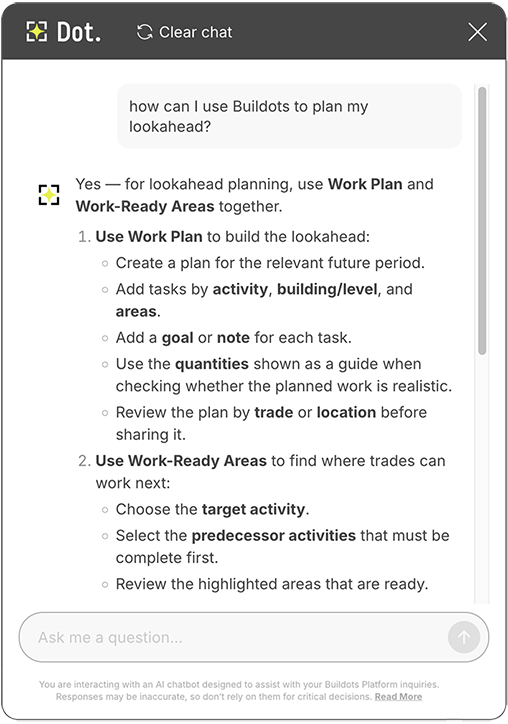
- It offers 24/7 platform support. Dot now answers “how do I…” questions about the Buildots platform instantly and can raise a support ticket for you if you need more help.
- It has a new look. Dot now comes with a new full-screen, conversational interface built for easy back-and-forth conversation – more like the AI tools you already use elsewhere.
How Buildots’ AI assistant helps construction teams put their data to work
Capturing detailed project data is a non-negotiable part of construction management today – the harder part has always been putting this wealth of information to work. At Buildots, construction intelligence isn’t just about gathering and storing data; it’s about helping teams act on it, whether they are on site or in the head office.
Project leaders need fast answers at their fingertips to guide the week’s work, whether they’re walking a site or at their desks. Executives need a high-level read of progress and risks that they can drill into without waiting on someone else to hand them a report. Owners and developers need an objective view of status and performance across their whole portfolio to drive continuous improvement. Dot supports them all.
Dot makes it easier than ever to put your data to work, delivering project manager-level analysis on demand and saving teams time with preconfigured tasks and 24/7 platform support.
Dive deeper into Dot’s new AI features:
Put Dot to work with Tasks
This is the biggest shift in Dot. You’re no longer limited to asking Dot questions about your project; you can now hand the AI assistant a preconfigured Task and let it do the work for you, saving even more time.
And this is just the start for Tasks in Dot. The team is already building the next batch of Dot Tasks, which will soon appear in the preconfigured library.
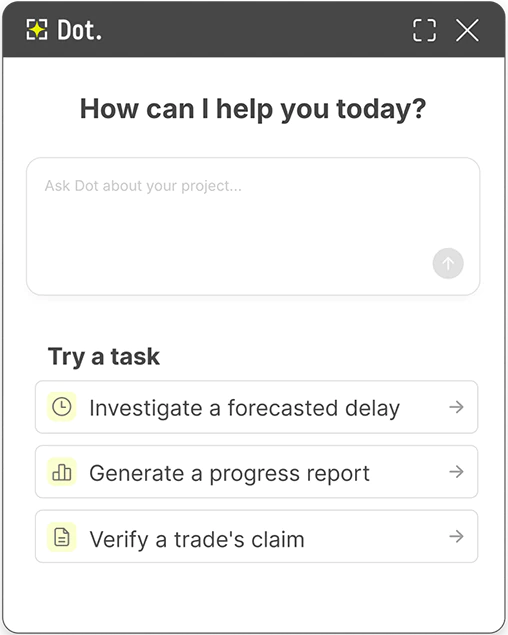
Our preconfigured library of Tasks in Dot includes:
Investigate a forecasted delay
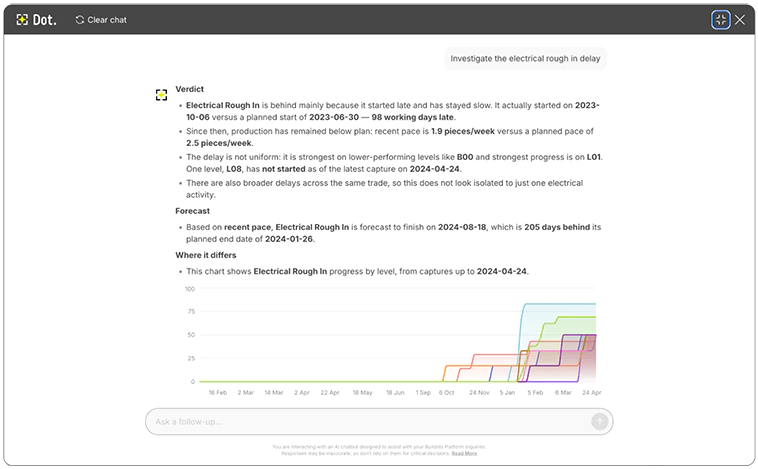
Want to better understand a forecasted delay? Assign it to Dot as a Task. Our AI digs into the progress and pace data behind the prediction, figures out what’s actually driving it, and reports back with a full explanation, not just a projected delivery date. With in-chat charts and graphs, you’ll be able to quickly see related progress, area by area, not just overall, so you can focus on where to mitigate risks.
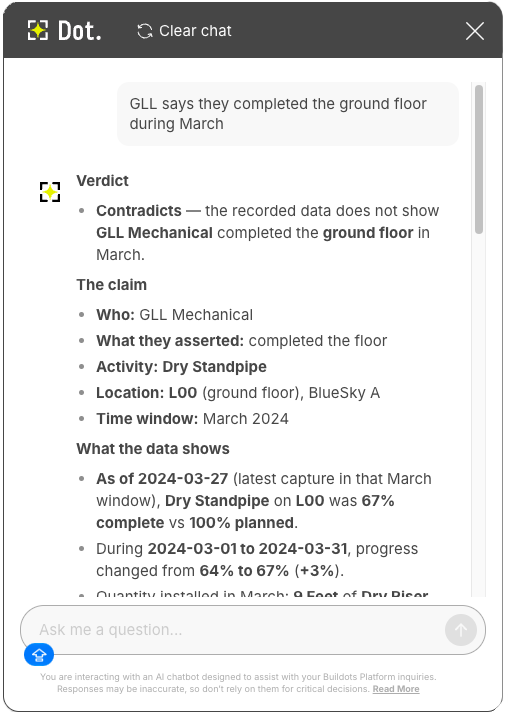
Verify a trade’s claim
Had a trade report an area as complete, but want to double-check before signing off? Assign it to Dot as a Task, and it will check the claim directly against the platform’s progress data, then confirm it or flag any discrepancies between what you’ve been told and what the data actually shows.
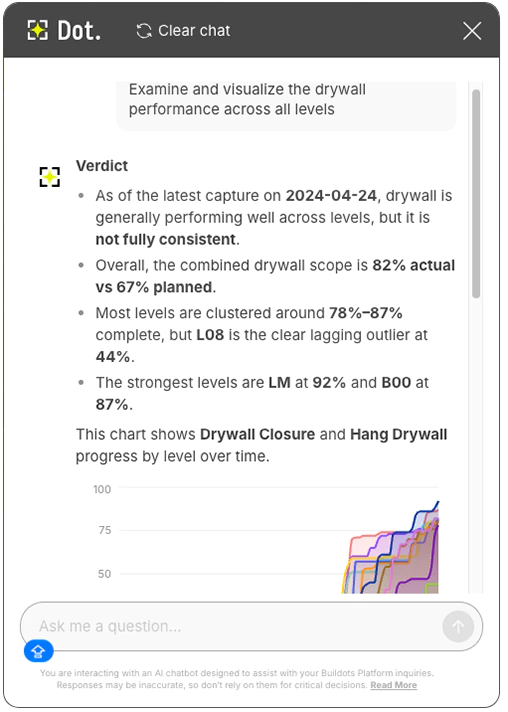
Analyze activity performance at every level
Wondering if an activity is falling behind in some areas of your site but not others? Your AI assistant can compare an activity’s performance across every location on your project, then flag where it’s falling behind and where it isn’t, giving you more than just a single project-wide average. This can help expose whether some floors have sequencing issues or other blockers, even if your project-wide average progress for that activity looks strong.
Get even deeper insights into your projects’ performance
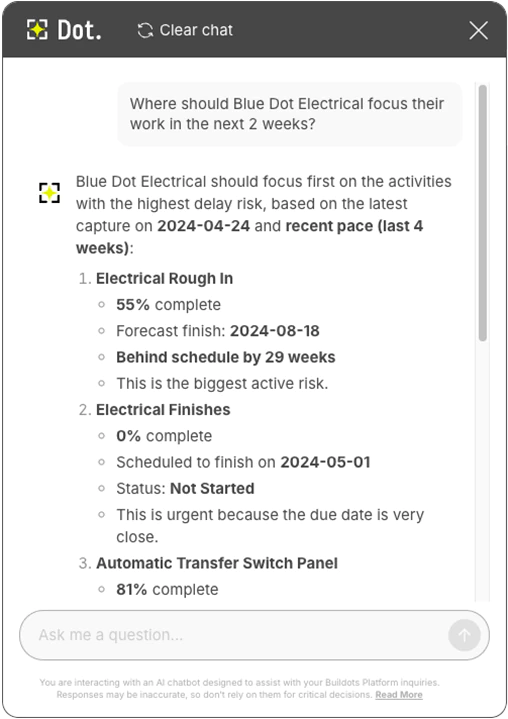
Your AI assistant can flag relationships, anomalies, trends, and seasonal patterns across reports that might not be visible on a single screen.
Say you want to know where your electrical trade should focus over the next two weeks. Instead of pulling up multiple screens to figure out where to put them, just ask Dot. It scans the data, spots where the work actually needs coverage, and suggests locations and activities on the spot.
Generate and export custom reports by chatting to your AI assistant
Need to quickly build a custom report ahead of a specific meeting? Skip the manual work. Tell Dot what you need, refine it through conversation, and export the finished report as a shareable PDF. And if you want to know how a figure was calculated, just ask.
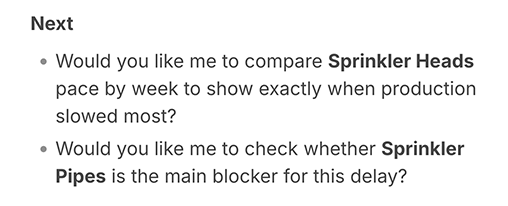
Every report Dot pulls now also comes with a “Why this matters” section, translating the raw data into valuable context and suggesting next steps and follow-up questions to help you dive deeper, rather than leaving you to figure out what a number means on your own.
Ask Dot to show its work, so you can report with confidence
Trusting a number is easier when you can see how it was reached. With Dot’s “glass box” (opposite of black box) approach, you can ask Dot to explain the logic behind any metric it provides.
Dot walks you through the calculation step by step, including any assumptions it made along the way. No secretive logic, just a straight answer to a straight question, so you can report to stakeholders with confidence.

“If a number from Dot ends up in a report you’re handing to an owner or a stakeholder, you need to be able to stand behind it. That’s why we built Dot as a glass box, not a black box. Ask it how it got to any figure, and it shows you, step by step.”
Yoav Wolfson, Principal Product Manager, Buildots
24/7 support
Nothing can ever replace the expertise of our hands-on customer success teams. But sometimes, you just need a quick answer to a simple question. Dot can now act as an always-on expert resource for Buildots users. Have a “how do I…” question about using the platform? Dot answers it instantly, pulling from the Buildots help center and Buildots Academy. If that’s not enough, it will automatically raise a support ticket for you.
A new full-screen interface option to focus on your chats
Dot’s desktop interface now comes with a new full-screen option, built to feel like the conversational AI tools you already use elsewhere. Launch it the same way you always have, then expand to full-screen whenever you need more room to dig in.
Get started with Buildots’ AI assistant for construction management
Dot isn’t a bolt-on tool or a separate subscription. It’s built directly into the Buildots platform and available to every user at no extra charge.
Dot is exclusive to Buildots: if you’re already a customer, you’ll soon find the upgraded AI assistant directly in your Buildots platform. If you’re not yet a Buildots user, this is what you’d get from day one.
Want to see Dot in action? Book a demo now, and we’ll walk you through how our AI assistant works on real construction projects.