Bridging design gaps: Accurate progress tracking for incomplete models
share


In an ideal world, a project’s BIM would be a pristine, 100% complete digital twin long before the first boots hit the site. Every pipe, stud, and socket would be accounted for, providing a flawless roadmap for construction.
But we don’t build in an ideal world. We build in the real one.
In the real world, trades often begin work long before the design coordination is finalized. Early design packages are released in stages, trades join the project at different intervals, and sometimes, entire floors or activities don’t have a model until after construction has already begun.
Unfortunately, this has become a customary practice. Projects running behind do not want to stop the pace of trades, so they build with the information they have, adapting on the fly to keep the schedule moving. Activities on that schedule that don’t have a model still exist and become a hidden project risk.
While we will always advocate for a detailed, high-integrity BIM setup, we recognize that total perfection is often a moving target. Even so, tracking against the model remains the only way to ensure design intent aligns with on-site reality. After all, if you aren’t measuring against the model, what are you measuring against? Our approach acknowledges these imperfections, using the model not as a static blueprint, but as a dynamic tool to highlight gaps and drive accuracy where it matters most.
Bridging the gap
Here lies the paradox. If we agree that tracking against the BIM is the only way to ensure design intent, what happens when that model is missing pieces?
To address this and provide more comprehensive construction intelligence, Buildots has launched two new features. They are designed to help teams bridge design gaps, highlighting what’s missing before it matters, and accounting for “known unknowns” to ensure your data remains accurate even when the BIM is incomplete.
Introducing Model Pending
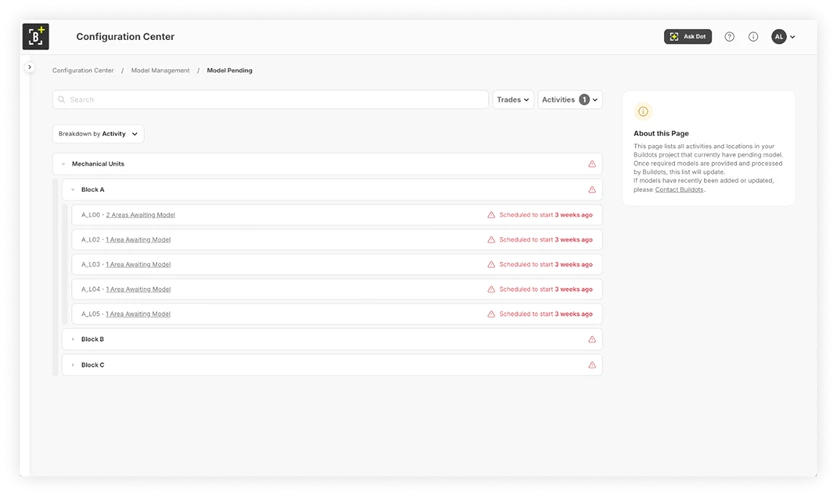
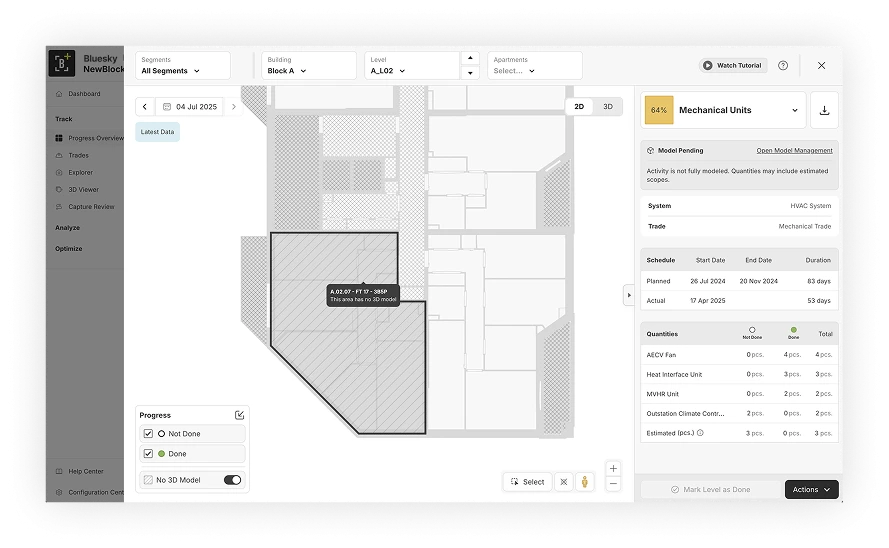
The Model Pending feature highlights missing models, allowing you to quickly address gaps before they have a knock-on impact, or create costly rework. Use it to:
- Spot gaps: Areas without BIM data are clearly flagged with a “model pending” indicator.
- Track early: See exactly how many weeks remain until that activity is scheduled to start, with a prioritized list of pending models ranked by which is due to start first.
- Improve readiness: Use in trade design and progress meetings to ensure models will be ready prior to construction starting.
Introducing Estimated Quantities
Most automated systems rely on the BIM, meaning they’re limited to modeled areas. Thus, any unmodeled scope is either excluded from the overall project data entirely or created in an unautomated, time-consuming manner.
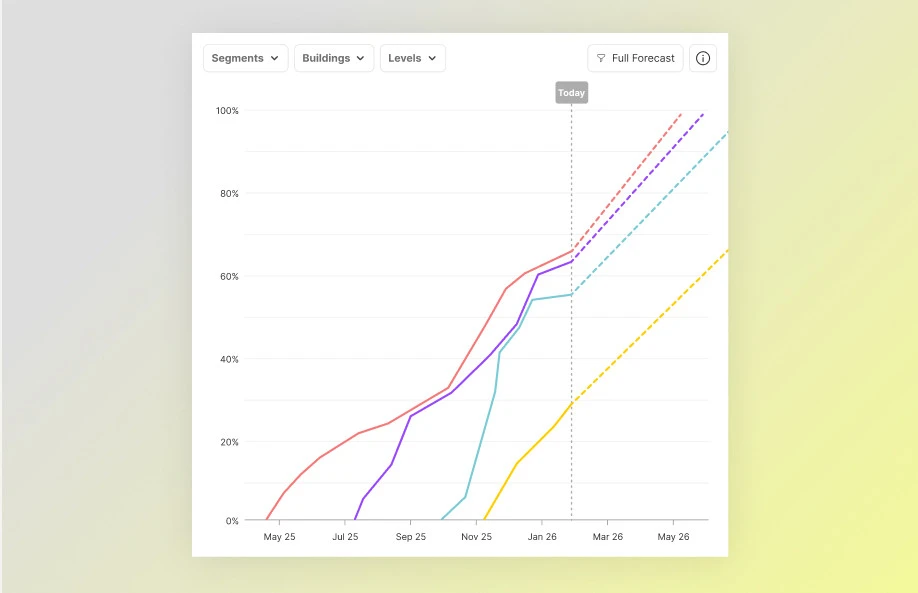
This creates a “data mirage.” Your progress figures look higher than reality because you’re only measuring part of the total scope. Activities remain invisible, and planned curves shift wildly when new models finally arrive.
Estimated Quantities lets you understand the true scope of your project and estimate progress even if your BIM model is incomplete. By extrapolating from existing data, the platform gives you a realistic target to track against from day one. Use it to:
- Estimate progress: Calculate progress across the entire project to ensure your completion percentages remain grounded in reality, even for unmodeled sections.
- Track manually: Record progress manually for activities that lack model elements. These are flagged as “estimated”, with dimensions provided in parentheses.
- Transfer data seamlessly: Replace placeholders with real elements as soon as the BIM arrives. Buildots will automatically carry over any manual progress you’ve recorded, maintaining a continuous, accurate record of work performed.
What does this mean for you?
With a prioritized view of exactly what’s missing from the start, you can alert design teams to potential risks and resolve gaps long before they have the chance to become a bottleneck on the schedule.
And with a comprehensive view of all project activities from day one, we’re effectively eliminating the data gaps that happen when the BIM lags behind the build. When your progress percentages account for both modeled and unmodeled scope, they finally reflect the physical reality of the job, providing the kind of high-integrity data you need for accurate reporting and forecasting.
It’s time to stop letting incomplete models create incomplete insights.
Want to see our model management features in action? Book a demo.